AI Generation & Credits
AI generation turns a text description into finished comic pages. You direct the story and style, and the model handles the artwork.
Generating a Comic
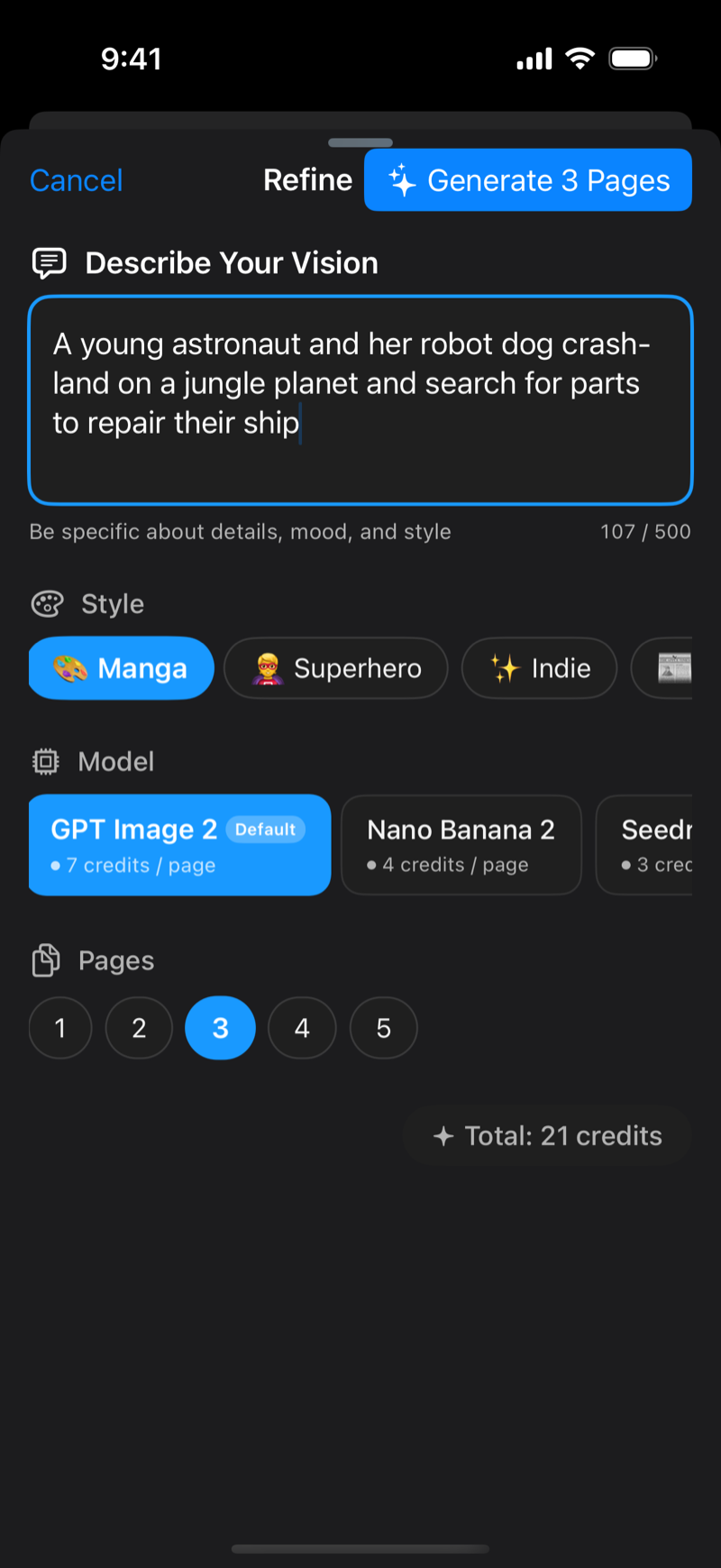
- In a project, tap Refine on the canvas
- Describe your vision in up to 500 characters, covering the story, characters, mood, and setting
- Pick a style. The options are Manga, Superhero, Indie, Newspaper, Pop Art, Noir, and Cartoon
- Pick a model. Each shows its credit cost per page, and the default is preselected
- Choose the page count, 1 to 5 for a new comic
- For 2 pages or more, choose whether to include a cover. With Cover page on, page 1 is a title illustration and the rest tell the story. The cover counts as one of your pages, so turn it off if you want every page to tell the story. ComicVerse remembers your choice
- Check the credit total and tap Generate
Generation takes a couple of minutes for a full page. Progress is shown per page, and you can keep using the app while it runs. Generation continues in the background, and a notification in Activity takes you back to the project when it's done. Closing the app mid-generation is fine, it resumes automatically.
Refining a Page
Once a page has been generated, Refine edits that page. Describe the change ("make it nighttime", "add rain", "give the robot a red scarf") and generate. Not happy with the result? Revert Last Refine in the canvas menu restores the previous version.
Writing Good Prompts
Be specific. Name the characters, the action, the setting, and the mood. Add cinematography terms like "close-up", "wide establishing shot", or "dramatic lighting". One scene per page reads best, so for a longer story generate multiple pages. For non-frontier models lettering comes out garbled, so add it afterwards with the Text tool.
Models
ComicVerse offers several image models, each with different strengths and per-page credit costs. The list is served live in the model picker, so new models appear there as they're added, with the recommended one marked Default. Cheaper models are great for drafting, pricier ones for final pages.
Credits
AI generation uses credits. Everything else in ComicVerse is free.
- Costs are shown per model, per page, with a running total before you confirm, so there are no surprises
- New accounts start with free credits to try generation
- Failed generations are refunded automatically
- Credits never expire
- Profile → Credits shows your balance and every transaction
Buying Credits
Top up under Profile → Credits → Top Up.
| Pack | Value |
|---|---|
| Comic Creator Credits: 100 | Base rate |
| AI Comic Maker Credits: 500 | 20% off |
| Pro Comic Studio: 1,000 | 30% off |
Purchases go through the App Store, and current prices are shown in the app.
Requirements and Limitations
Generation requires Sign in with Apple and an internet connection, since processing happens in the cloud. Quality tracks prompt clarity, so vague prompts give generic pages. Character consistency across pages benefits from repeating the same character description and style in each prompt.